How to use Nuclear Trainer
This guide works like zooming in on a drawing: the whole plant, one building, the systems inside it, one system or circuit, one piece of equipment, and finally parts, clearances and safety. Each level builds on the one before.
Plan on 30 to 45 minutes the first time through. Open the trainer in a second tab and do each Try it box as you reach it.
Before you start
- Browser: a current Chrome or Microsoft Edge on a desktop or laptop. Edge has the most natural voices.
- Mouse: a mouse with a scroll wheel is much easier than a trackpad.
- Nothing to install: the trainer runs in the browser, with no login.
- Progress is saved in this browser on this computer. Use Download my progress and Import progress under Learn to move it.
- Going to a real plant? Read the Safety guide first. The plant's own rules, its radiation protection staff and your escort always come first.
What's new
Updated November 8, 2026 (site version 4.1).
- Version 4.1: easier-to-read drawings. Long entries in the cable schedule, line list and instrument index now wrap inside their columns instead of being cut off. Line numbers on the turbine P&IDs sit beside their lines, and labels on every sheet were moved so none overlaps another or runs off the sheet.
- Version 4: drawings and cables for the plant. Six P&IDs with line numbers on every pipe, a protection and actuation logic sheet, feeders for every large motor on the auxiliary one-line with a short-circuit table, raceway plans, cable and raceway schedules with plant-wide cable numbers, a line list and an instrument index. Every powered load in the containment and turbine building now has a terminal box, a feeder path and a cable; safety-related circuits run by division (A to D) through their own penetrations, trays and conduit. Pipe branches have tees or branch outlet fittings, the 6.9 kV tray has a barrier between voltage classes, and power trays carry a ground conductor.
- Also in version 4: switchyard relay protection that matches the relay house (24 panels, two systems on every line and transformer), a breaker for each reserve auxiliary transformer, revenue metering, fiber in one shield wire of each line, main steam and feedwater through the auxiliary building in the site view, lightning protection on the shield building and the turbine building, pH adjustment baskets in containment, the condensate polisher, a Safety guide rewritten for a nuclear plant (emergency planning, the full dose-limit table, the radiologically controlled area, lockout/tagout, permits) with a new quiz, a faster 3D view, a skip link and focus outlines for keyboard users, and fixed drawing issue dates.
- Accuracy review (v3). Every building was checked against public NRC descriptions, OSHA walking-surface rules and the switchyard clearance tables, and the problems found were fixed. Among them: steam generator channel head flow, the reactor vessel supports and primary shield wall, a maintenance floor with stairs, guardrails on every open edge, extraction steam and heater drain piping, condensate to all three condenser necks, feedwater flow venturis in each feedwater line, pipe supports, the turbine hatch, and 500 kV phase clearances.
- Cable routing with real fittings. Trays now turn only through catalog fittings (horizontal and vertical bends, tees), and the cables follow them. Trays enter through sealed fire-wall openings and hang on trapezes and riser frames. Conduit has couplings, LB bodies, drop-out fittings at the trays, hubs on the medium-voltage motor boxes, liquidtight flexible conduit at motors and transmitters, and supports every 10 ft or less.
- New on the plant site: meteorological tower, service water cooling tower, hydrogen and carbon dioxide storage, a water treatment building, shield wires on the outgoing lines, and corrected roads and parking.
- Version 2. The Plant site tab with the whole plant, the turbine building, X-ray that hides walls and roofs, and the steam cycle diagram.
The whole plant
Nuclear Trainer is a 3D model of a generic commercial nuclear power plant, built one building at a time. You can orbit and zoom each building, open the containment in cutaway, click any part to learn what it is, open the drawings side by side with the model, and practice tasks modeled on real work, such as switching in the switchyard, clearance checks and fault tracing. It is a training model of a generic plant: not any real plant or design, and not a construction drawing.
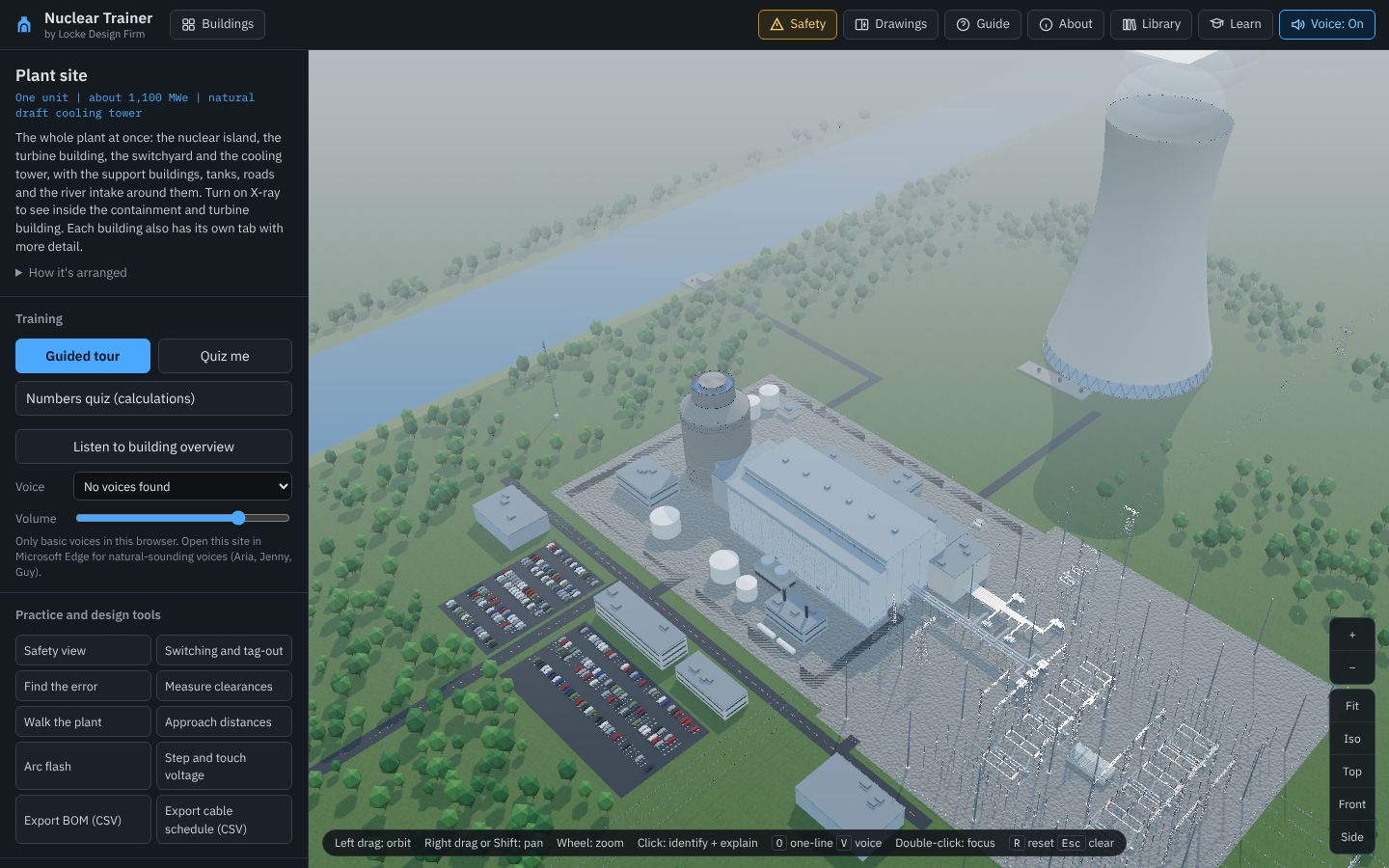
The four areas of the screen
| Area | What's in it |
|---|---|
| Header | The Buildings menu and the building tabs, plus buttons on the right: Safety opens the safety guide (level 6), Drawings opens the drawing pane, Guide opens this guide, About opens the disclaimer and references, Library opens the equipment library, Learn opens lessons, the glossary and the certificate, and Voice: On / Voice: Off turns the spoken explanations on and off. |
| Side panel | Top to bottom: the building name, ratings and description; Training (tour, quiz, trip trace, voice settings); Practice and design tools; Layers and display settings, including Cutaway in the containment; and the searchable Component catalog. On a narrow screen it hides behind the ☰ button. |
| 3D view | The model with its labels. Zoom and view buttons sit on the right edge, and a strip of mouse hints runs along the bottom. |
| Drawing pane | Opens on the right when you press Drawings or O. The 3D view shrinks to make room. Covered at level 3. |
The buildings
Four tabs cover the plant so far. The inside of the auxiliary building and the support buildings follow in later releases.
| Tab | What it is | What it teaches |
|---|---|---|
| Plant site | The whole plant: one unit of about 1,100 MWe with a natural draft cooling tower | Start here. How the nuclear island, turbine building, switchyard, cooling tower, river intake, tanks and support buildings fit together. Turn on X-ray to see inside the containment and the turbine building. |
| Containment | Steel containment inside a concrete shield building; two-loop PWR, about 3,400 MWt | The reactor vessel and core, two steam generators, four canned-motor pumps, the pressurizer, and the passive safety systems that cool the core and the containment with gravity, stored energy and natural circulation. Opens in cutaway. |
| Turbine building | 1,800 rpm turbine-generator, 1,375 MVA, with the condenser and feedwater train | How the steam does its work: high- and low-pressure turbines, moisture separator reheaters, generator, condenser, feedwater heaters, deaerator and pumps. X-ray hides the walls and roof. |
| Switchyard | 500 kV breaker-and-a-half yard and a 230 kV reserve line | How the generator reaches the grid through three single-phase step-up transformers, and the two offsite power circuits: the main path through the unit auxiliary transformers and the reserve path through the reserve auxiliary transformers. Switching practice, protection and grounding. |
Where to start card
The first time you open the trainer, a card asks what brings you here: new to nuclear plants, designer, operator or technician, or going on site. Each choice suggests a building and a first tool. You can reopen it from the Buildings menu.
Links to a building or a part
The address bar follows you: ?station=site opens the plant site, ?station=turb the turbine building, ?station=cont opens the containment and ?station=yard&part=gsu_transformer opens the switchyard with the step-up transformers selected. Share a link to point a colleague at the same thing.
Try it
- Open the trainer in another tab.
- On the Plant site tab, tick X-ray and look into the turbine building.
- Click the Turbine building tab, then the Containment tab.
- Open the Buildings menu and read the one-line descriptions.
One building
Each building is a full 3D model. Learn to move around it before zooming in.
Mouse and keyboard
| Action | Mouse | Keys |
|---|---|---|
| Orbit | Left drag | Arrow keys move in walk mode |
| Pan | Right drag, or Shift + left drag | |
| Zoom | Wheel | + and − |
| Identify a part | Click | Esc clears |
| Focus on a part | Double-click | F with a part selected |
| Reset the view | Fit | R |
Standard views
The buttons on the right edge give Fit, Iso, Top, Front and Side views. Front in the containment looks straight at the cut face, like the section drawing.
Cutaway
The containment opens with the near half cut away along a plane through the reactor vessel and both steam generators. Concrete and steel that are cut show a solid gray face; the ground in front is dug out, so the basemat and everything below grade show in section. Equipment stays whole, so the tanks and pipes on the near side are still there. Turn the cut off and on with Cutaway under Layers.
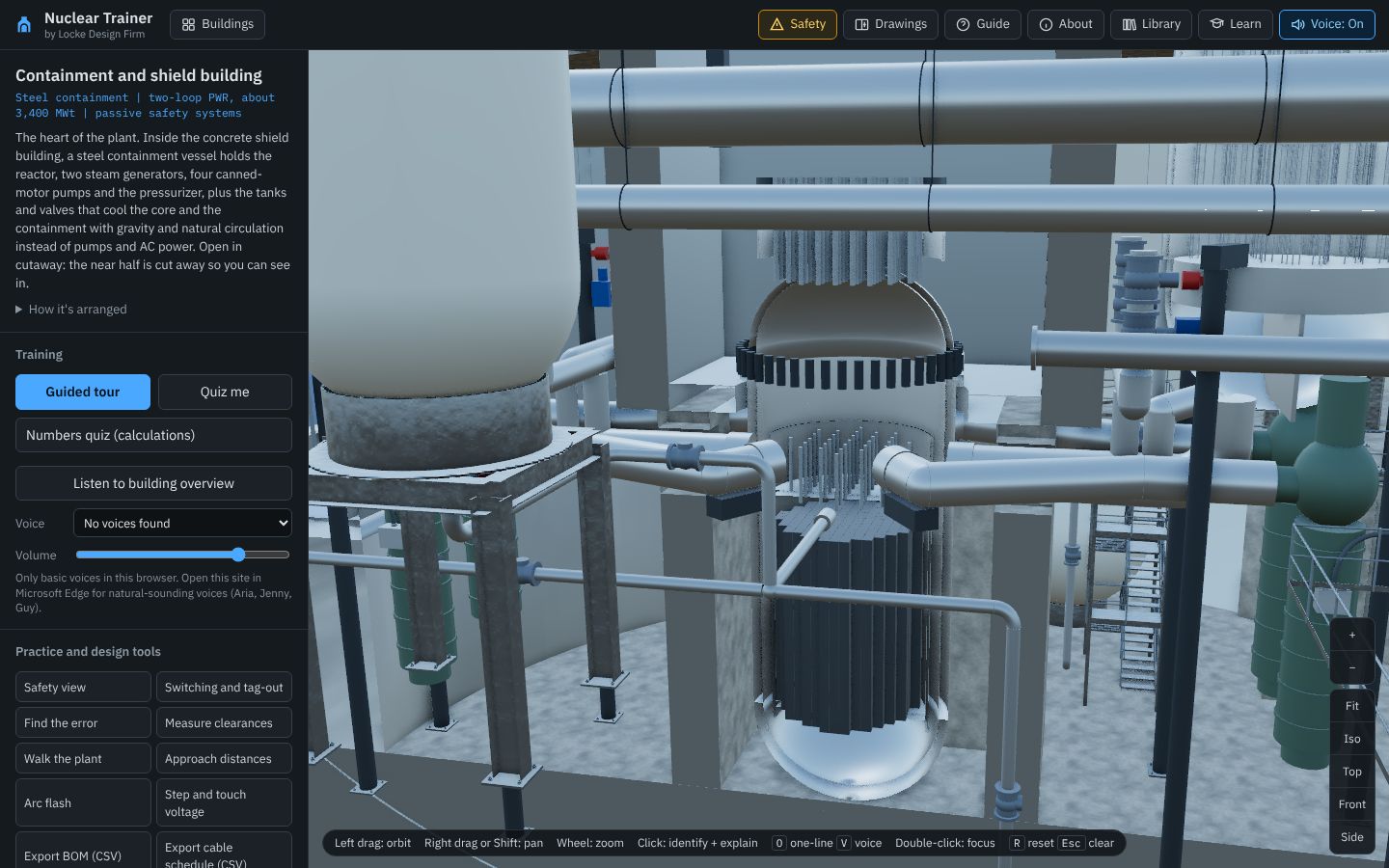
Labels change as you zoom
Turn on Labels under Layers. Far away you see area names (shield building, containment vessel, IRWST); closer in, the big equipment; closest, individual parts.
If the model feels slow
Set Quality to Fast, turn off Shadows, and close the drawing pane. The switchyard has more parts than the containment.
Try it
- In the containment, press Top, then Front.
- Zoom in on the reactor vessel until you see the fuel assemblies.
- Turn Cutaway off to see the outside of the shield building, then on again.
The building's systems
Layers
Each layer can be hidden: Equipment, Piping and valves, Bus and conductors, Structures, Foundations, Grounding, Raceway and cable, Buildings, and Site and fence. Hide Structures in the containment to see the equipment without the concrete around it.
X-ray
X-ray hides the walls and roofs of the buildings that are modeled inside (the shield building and containment vessel, the turbine building) so you can see the equipment, makes floors and the massing-only buildings see-through, and makes the ground transparent so you can follow buried pipe, the ground grid and the below-grade concrete. Hidden walls can't be clicked; turn X-ray off to select them.
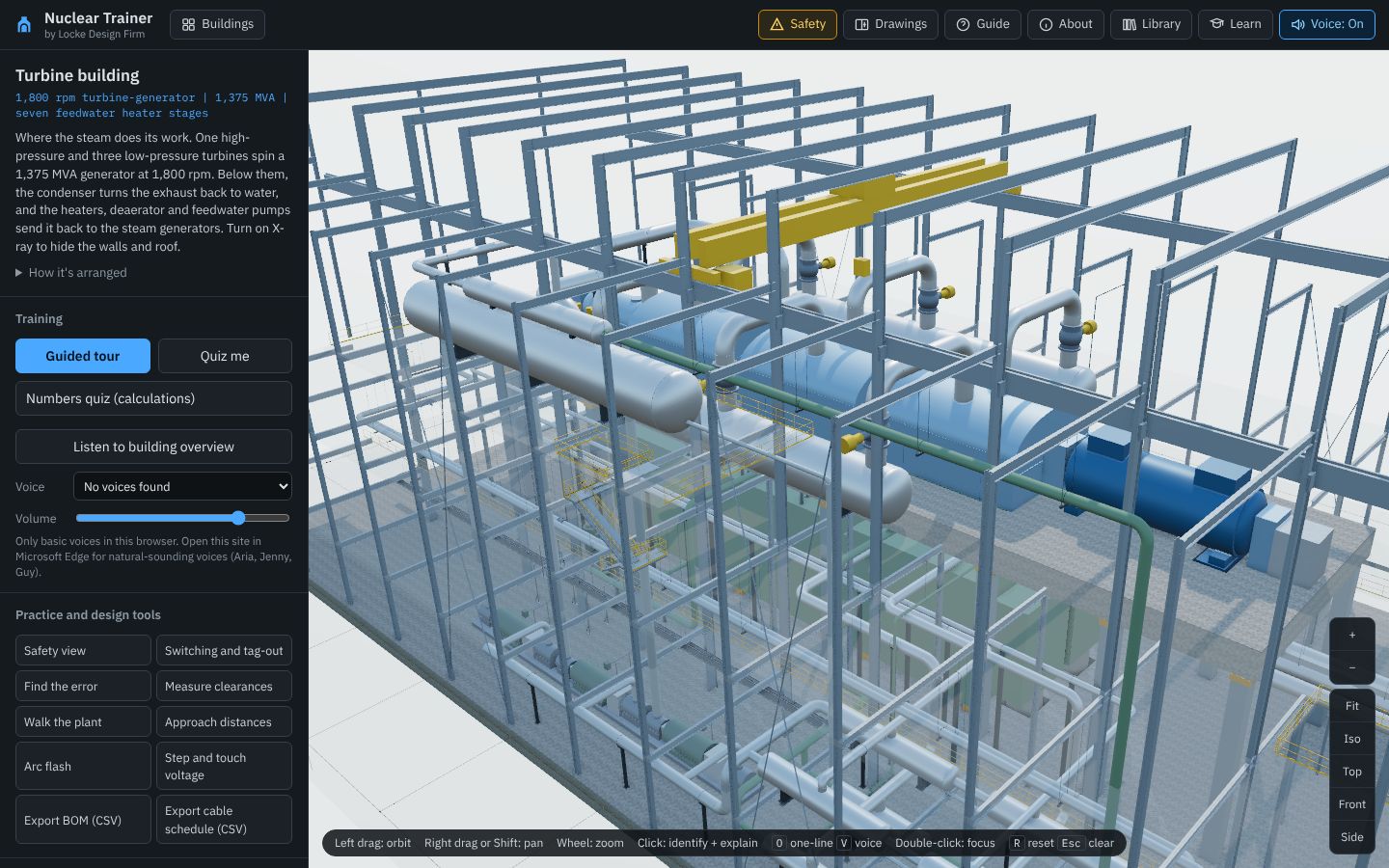
Component catalog
The searchable list at the bottom of the side panel has every part type in the building, grouped by category. Click a row to highlight every one of them in 3D.
Equipment library
Library lists every modeled item across all the buildings, plus reference entries for equipment not modeled yet, each with a picture, what it does, the standards and regulations that cover it, and where to find it.
The drawing set
Press Drawings or O. Click a symbol to find the equipment in 3D; click equipment in 3D to find it on the sheet. Every sheet downloads as a DXF.
| Sheet | Where | What it shows |
|---|---|---|
| P&IDs NPP-PID-01 and -02 | Containment | Piping and instrument diagrams of the reactor coolant system (both loops, pressurizer, surge and spray lines, depressurization stages 1 to 3) and of passive core cooling (passive RHR heat exchanger, core makeup tanks, accumulators, IRWST, direct vessel injection, stage 4). Every line carries its line number, valves are drawn in their normal position, and every symbol links to the model. |
| P&IDs NPP-PID-03 to -06 | Turbine building, plant site | Main steam and turbine, feedwater, condensate and air removal, and circulating water, with line numbers and valve positions. |
| Protection and actuation logic | Containment | Four divisions, two-out-of-four voting, the reactor trip switchgear, and which signals actuate the core makeup tanks, passive RHR, the depressurization stages and containment isolation. Parameters are named; no setpoints are given. |
| Passive safety systems | Containment | How the core makeup tanks, accumulators, IRWST, passive RHR heat exchanger, the four depressurization stages, recirculation and passive containment cooling connect to the reactor coolant system. A schematic, not to scale. |
| Containment section | Containment | Section A–A through the reactor vessel and both steam generators, the same cut as the 3D view, with plant elevations. |
| Steam cycle | Plant site, turbine building | The water and steam path through the plant: steam generators, main steam, turbines, moisture separator reheaters, condenser, heaters, deaerator, feedwater pumps and the circulating water loop to the cooling tower. A schematic, not to scale. |
| One-line | All | The plant one-line: generator, generator breaker, step-up transformers with their impedances, the 500 kV yard, the 230 kV reserve line with a breaker for each reserve auxiliary transformer, the unit and reserve auxiliary transformers to the 6.9 kV buses, the point of interconnection with its revenue metering, and a protection table by element. |
| Auxiliary one-line | All | The 6.9 kV buses with a feeder for every large motor (reactor coolant pumps with their variable-speed drives, feedwater, condensate, circulating water and other pumps), each with its breaker, rating, full-load current and cable; the 480 V load centers and motor control centers with the plant motors, pressurizer heaters and polar crane; the four safety-related DC divisions; and a short-circuit table computed from the transformer impedances and the motor contribution. |
| Protection zones, three-line, AC and DC schematics, cable block, relay panels | Switchyard | The switchyard protection and control set. |
| Arrangement plan, grounding plan, foundation plan | All (grounding and foundation plans in the containment and switchyard) | Plans drawn from the model. |
| Section, conduit plan, lightning shielding, bus configurations | Switchyard | The switchyard physical set and the bus study. |
| Raceway plan | Containment, turbine building | Trays with their fittings, tray IDs, widths and elevations, the voltage barrier, conduit with trade sizes, flexible conduit, drop-outs, seals and electrical penetrations. |
| Cable and raceway schedule | Containment, turbine building, plant site | Every cable with its number, from, to, function, conductors and length, then the trays and the conduit. Cable numbers carry the building (CT- containment, TB- turbine building, SY- switchyard, ST- site) and stay the same in the building view and the site view. Safety-related cables go to their division (A to D). |
| Line list and instrument index | Containment, turbine building, plant site | Every numbered pipe line (size, service, from, to, length, safety class) and every instrument with the line it taps. Both download as CSV. |
| Legend | All | Every symbol used, with its basis. |
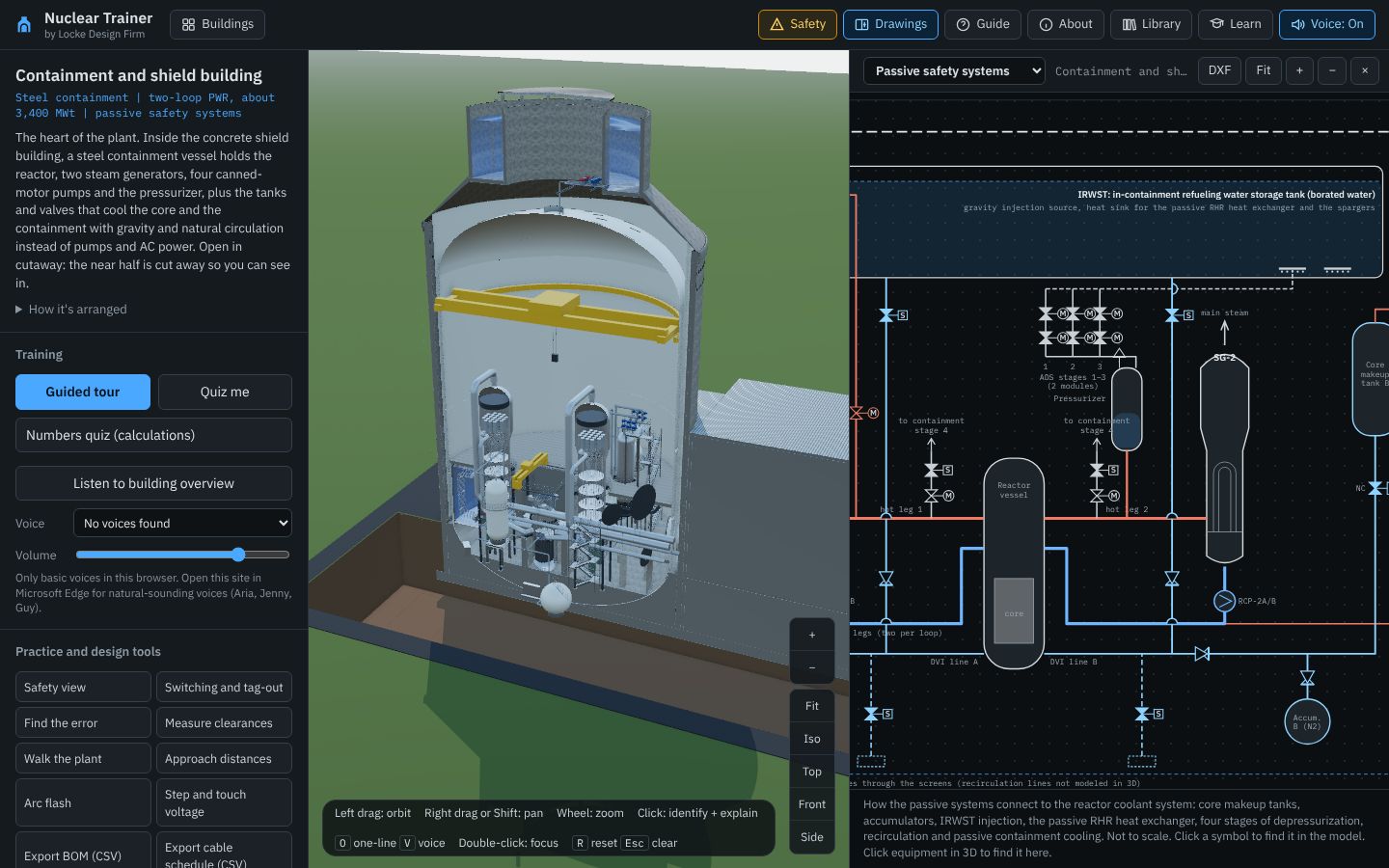
Try it
- In the containment, open Drawings and pick Passive safety systems.
- Click the core makeup tank discharge valve on the sheet and watch the model.
- Open Containment section and compare it with the 3D cut.
One system or circuit
Guided tour
Guided tour walks through the building stop by stop, highlights each item and explains it, spoken if Voice is on. The containment tour goes from the shield building to the reactor, the passive systems and a remote-mounted transmitter with its tubing and conduit.
Passive safety, step by step
Follow the passive safety diagram from top to bottom: the core makeup tanks inject at full reactor pressure; the accumulators inject when pressure falls below their nitrogen pressure; stages 1 to 3 of depressurization vent the pressurizer to the IRWST spargers; stage 4 opens the hot legs to the containment; then the IRWST drains into the vessel by gravity, and later the water on the containment floor flows back through the recirculation screens. The passive RHR heat exchanger and passive containment cooling remove the heat the whole time.
Trace a trip (P&C)
In the switchyard, Trace a trip (P&C) follows a fault from the relay to the lockout and every breaker it trips, step by step on the drawings.
Switching and tag-out
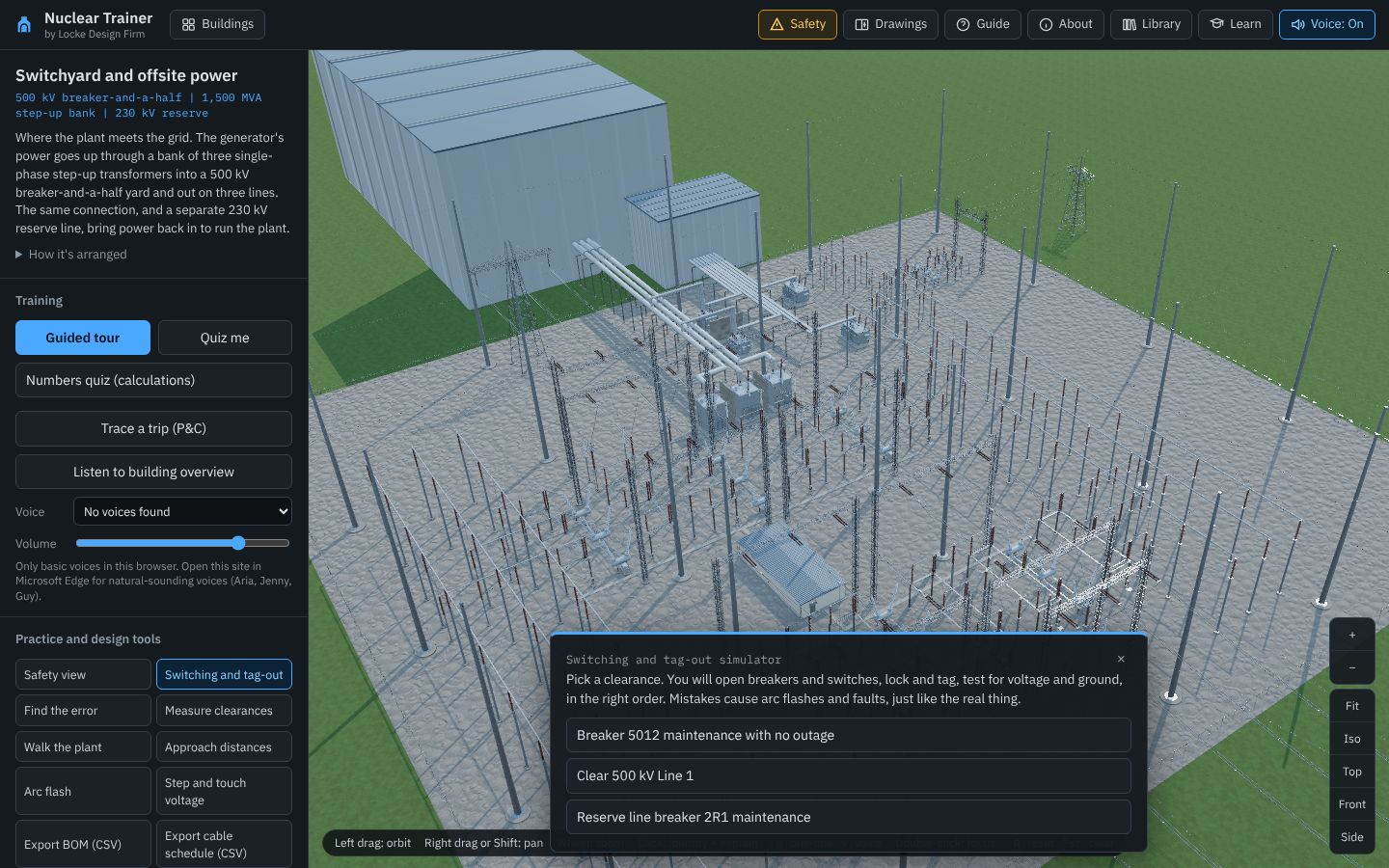
In the switchyard, Switching and tag-out gives you a clearance to write and carry out: open breakers, open disconnects, tag, test for voltage, and ground, in the right order. Get it wrong and the simulator tells you why, including an arc flash for opening a disconnect under load.
| Task | What it practices |
|---|---|
| Breaker 5012 maintenance with no outage | Taking a center breaker out of a breaker-and-a-half diameter without dropping either circuit. |
| Clear 500 kV Line 1 | Isolating and grounding a line with both its breakers. |
| Reserve line breaker 2R1 maintenance | Working on the 230 kV reserve circuit while the plant keeps its main offsite power path. |
Try it
- Start the guided tour in the containment.
- In the switchyard, run Switching and tag-out on the first task.
One piece of equipment
Reading the info panel
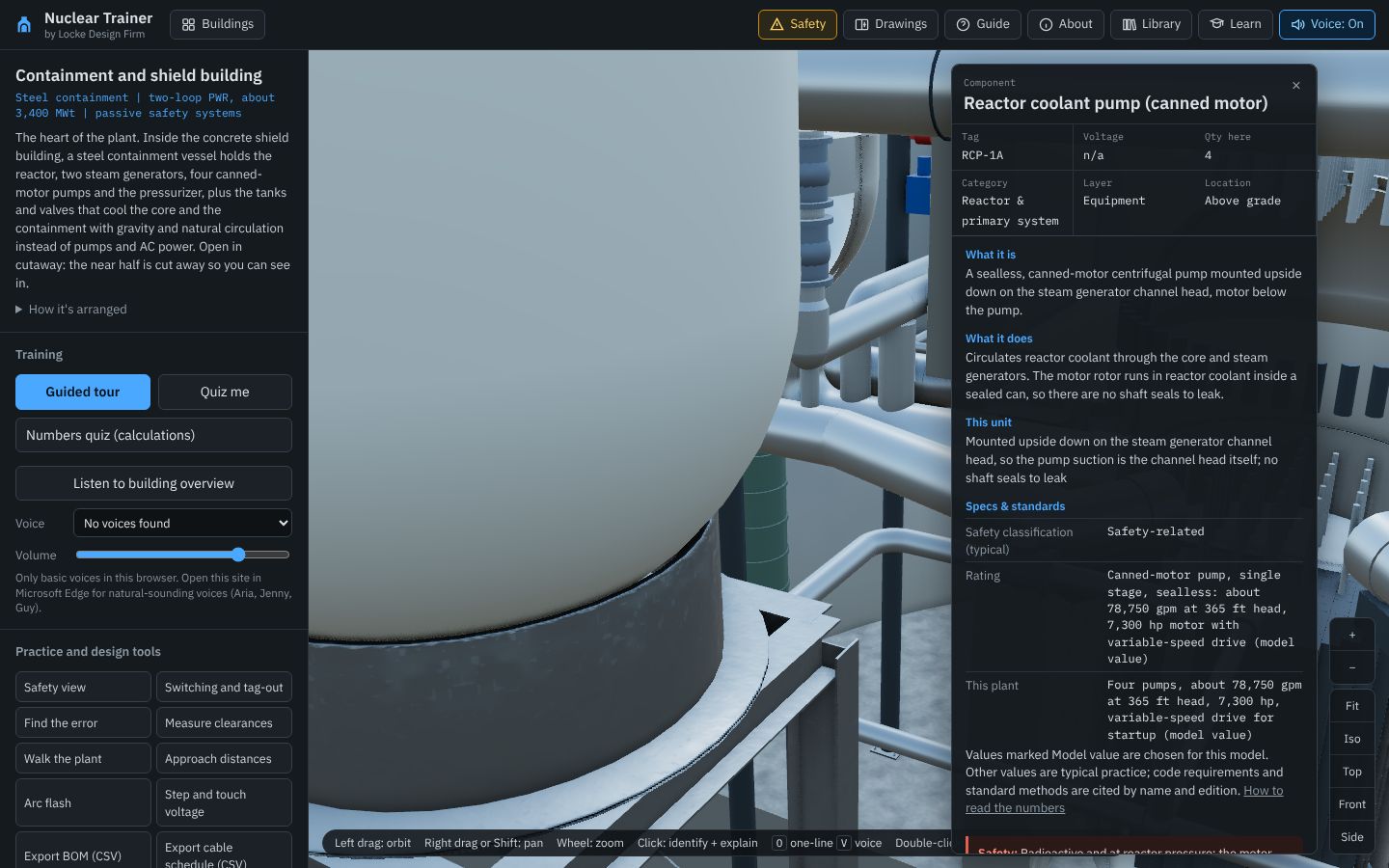
Click any part. The panel shows its name and tag, what it is and does, this unit's rating, specs and standards, a typical safety classification for plant equipment (safety-related or non-safety), and its safety note. Values marked "model value" are chosen for this generic plant; regulations and standards are cited by name, and by edition where checked.
Panel buttons
Listen reads the explanation aloud, Focus flies the camera to the part, Isolate hides everything else, and Highlight all shows every part of the same type.
Compare other types
Some cards have a Compare button that opens a gallery of other designs of the same kind of equipment.
Voice settings
Pick a voice and volume under Training. Microsoft Edge has the most natural voices.
Try it
- Click a reactor coolant pump and read its card.
- Click a squib valve, then press Isolate.
Parts, clearances and safety
The Safety guide
Safety opens a guide written for visitors and people new to the plant. It starts with the hazards of the whole plant and the golden rules. Radiation and contamination covers postings, time, distance and shielding, the dose-limit table quoted from 10 CFR 20, monitoring and contamination; then come entering and leaving the radiologically controlled area, chapters for the containment, the turbine building and the site, the switchyard and electrical hazards, clearances and lockout/tagout (OSHA 1910.147 and 1910.269), environmental review and permits, and emergency planning (emergency planning zones and the four emergency classes from 10 CFR 50.47 and Appendix E), all at the level of the free NRC and DOE training material. It is not radiation-worker training and never replaces the plant's rules or your escort.
Linked to the model
Safety view colors the building by what can hurt you: energized parts, stored energy, fire, gas, ground potential, trips and confined spaces, buildings, and radiation. Each card has a Show in the model button.
Measure clearances and approach distances
In the switchyard, Measure clearances checks the distance between two points against clearance tables, and Approach distances draws the OSHA minimum approach distance around live parts.
Walk the plant
Walk the plant puts you at eye height. Use the arrow keys or WASD; the screen warns you near energized parts.
Step and touch voltage
In the switchyard, this tool maps the ground potential rise during a fault and checks touch and step voltage against the IEEE 80 limits.
Arc flash
A teaching calculator using the IEEE 1584-2002 equations, with plant teaching cases such as a 480 V load center and 6.9 kV switchgear. It is not an arc-flash study.
Find the error
Find the error removes or moves parts in the switchyard; find what is wrong. It appears only where it has something to hide.
Try it
- Open Safety and read Radiation and contamination.
- Turn on Safety view in the containment and click the radiation family.
Proving what you learned
Quiz me
Quiz me asks ten questions about the equipment in the building on screen. Eight of ten counts toward the lessons. The Safety guide has its own quiz: seven plant and radiation questions and three switchyard questions, drawn from a pool of 25.
Numbers quiz
Calculation and lookup questions, with the working shown: full-load current, approach distances, touch voltage, the rolling sphere.
Lessons
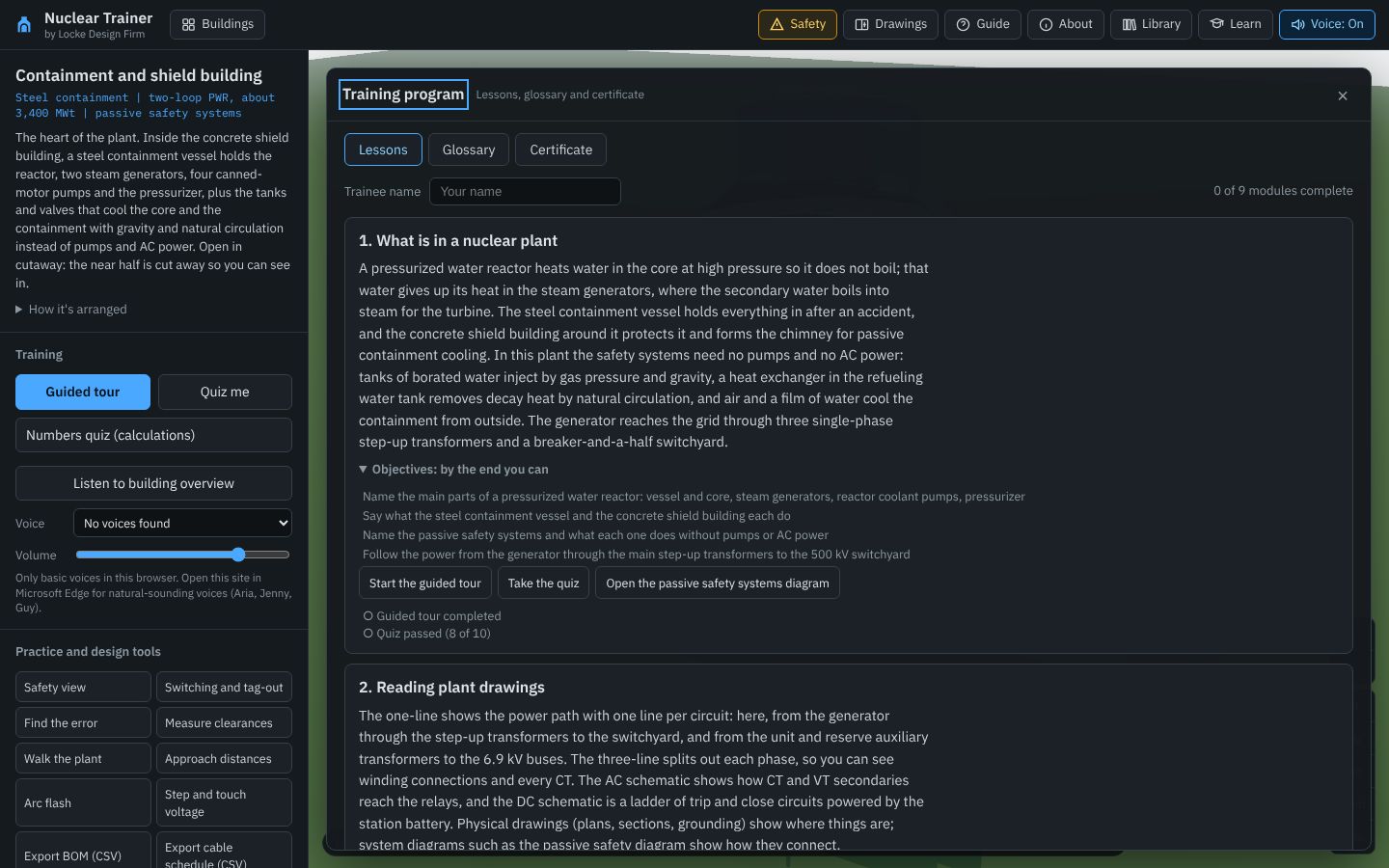
Learn has nine modules, from what is in a nuclear plant to switchyard and plant safety. Each lists its objectives and is complete when you finish its activities, not when you open them.
Glossary and certificate
The glossary has every term and device number. When every module is complete, print a certificate of participation. It records a self-paced program; it is not operator, technician or radiation-worker qualification.
Export BOM (CSV)
A bill of materials for the building on screen, with quantities and the basis for each count. Lengths (pipe, tray, conduit, tubing, cable) are in meters of run length; each row shows its typical safety class and whether a 10 CFR 50 Appendix B quality program applies.
Quick reference
Keyboard shortcuts
| Key | Does |
|---|---|
| O | Open or close the drawings |
| V | Voice on or off |
| R | Reset the view |
| F | Focus on the selected part |
| + / − | Zoom |
| Esc | Clear the selection, close a tool or stop the tour |
A suggested plan for a new hire
- Read the Safety guide's first two chapters.
- Take the containment guided tour, then the quiz.
- Follow the passive safety diagram and the containment section beside the model.
- In the switchyard: the one-line, a trip trace and the first switching task.
- Work through the lessons in order.
If something isn't working
| Problem | Try |
|---|---|
| The model is slow | Quality Fast, shadows off, drawings closed. |
| I cannot see inside the containment | Turn on Cutaway under Layers. |
| Progress is gone | Progress is saved in one browser on one computer. Use Download my progress and Import progress on the Certificate tab. |
| I found a mistake | Use the report form on the About page. Every report is checked against the source. |